AI meeting summaries that stay connected to the recording
note1 turns each Google Meet recording into an AI meeting recap with generated summary sections, action items, transcript search, speaker insights, questions, topics, Prep Notes as extra source material, and timestamp links back to the call.
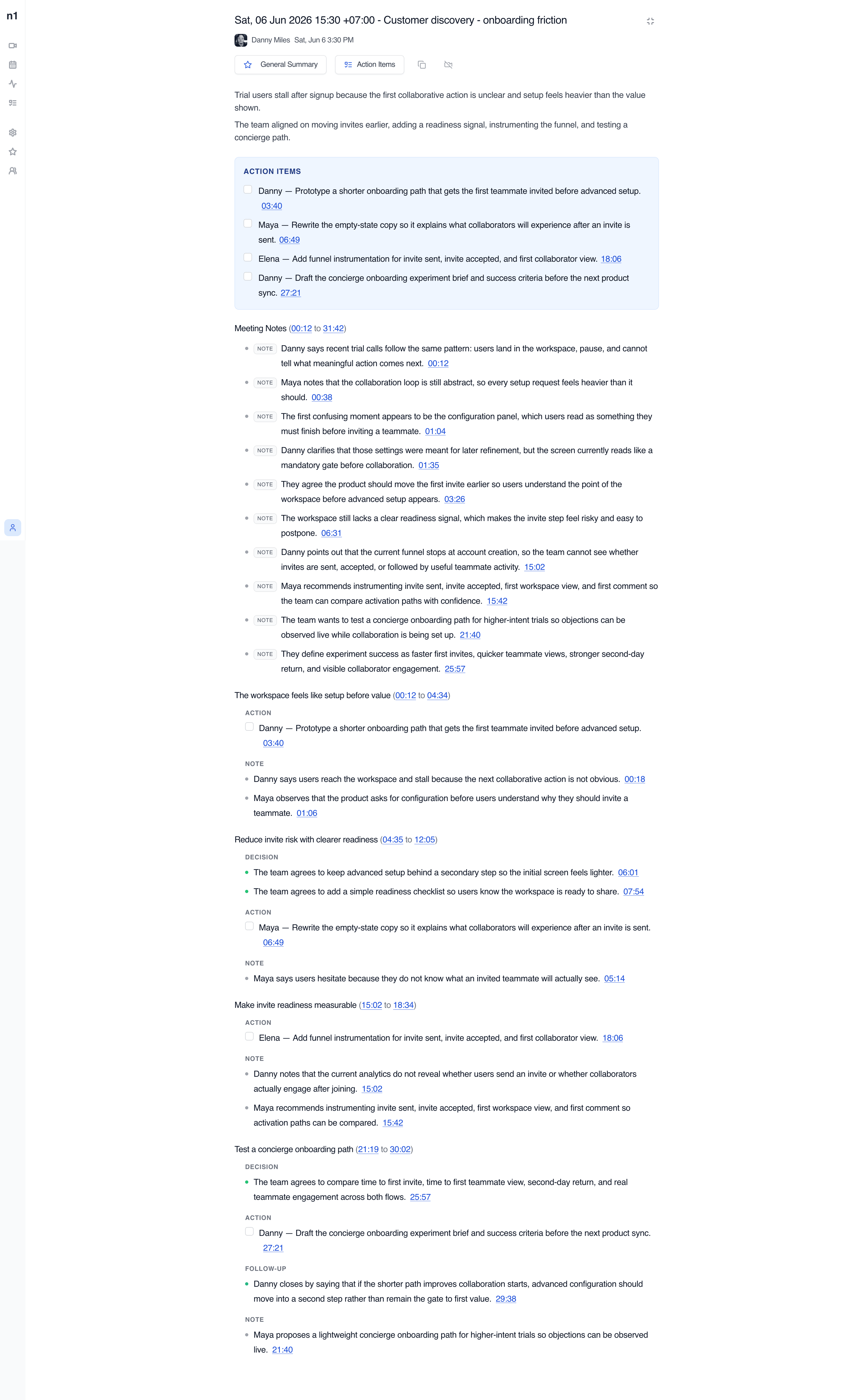
The summary lives beside the recording and transcript
note1 does not leave you with a disconnected paragraph. The dashboard opens a meeting summary page where the recording, generated notes, action items, and searchable meeting transcript all stay together.
Recording playback
Watch the meeting while reviewing the generated summary.
Summary sections
Read grouped notes with headings, kinds, and time ranges.
Transcript pane
Search exact wording and jump back to speaker-grouped transcript moments.
Insights sidebar
Review speakers, questions, and topics alongside the meeting record.
Adjust the summary style for the meeting you just had
note1 comes with a selection of prepopulated summary styles for every use case, so the generated AI meeting notes can match the way your team reviews sales calls, interviews, product reviews, planning meetings, and recurring syncs.
Switch the style from the meeting page and note1 regenerates the summary around the structure that fits the conversation.
For recurring manager and direct-report conversations, see how AI meeting notes for 1:1s connect the summary style to transcripts, action items, and privacy controls.
Use-case presets
Choose from ready-made styles like Team Meeting, Standup, Interview, and Presentation.
Regenerated notes
Changing the style updates how the same meeting is organized for review.
Summary style
The same selector shown on the meeting page
Action Items
- Danny - Confirm QA owner before Friday04:12
- Elena - Share updated launch checklist with the team09:44
- Maya - Collect open customer questions for design review18:06
Action items can also be tracked from a dedicated dashboard.
Learn moreFollow-ups are pulled out before the full notes
The summary page collects action bullets across all generated sections and displays them in a dedicated block. Owners and timestamps stay visible, giving you meeting summaries with action items that are easier to review.
Owner labels
Action items can show the person responsible for follow-up.
Checkable tasks
Generated follow-ups appear as task-style rows for easier review.
Timestamp links
Timestamped meeting notes can jump back to the source moment in the recording and transcript.
Decisions, blockers, risks, notes, and follow-ups stay separate
Summary bullets are grouped by section and labeled by kind, so a teammate can scan what was decided, what needs action, and what still needs attention.
Launch readiness review(02:18 to 14:06)
- DecisionRelease date remains Friday.02:18
- BlockerQA ownership must be assigned before the checklist is final.04:12
- NoteCustomer questions should be collected before design review.09:44
Follow-up plan(14:07 to 22:31)
- ActionDanny will confirm the QA owner.16:20
- Follow-upElena will post the revised checklist after the call.18:06
Verify the summary without leaving the meeting page
The transcript pane supports search, speaker-grouped segments, timestamp links, and playback highlighting. The insights sidebar adds speakers, questions, and topics generated from the same meeting recap.
What is still blocking launch?
Launch readiness
QA ownership, checklist timing, and customer questions.
02:18 - 14:06Built around the same meeting summary page your team reviews
The summary is a scrollable meeting document with overview context, action items, AI meeting notes, categorized bullets, and links back to exact moments in the call.
How teams use an AI note taker
Team Meeting Notes
Review team syncs, planning calls, and weekly updates with AI meeting notes, searchable transcripts, and visible follow-ups.
View use caseAI Meeting Assistant for Managers
Catch up on decisions, review action items with source context, and return to the meeting moments that need your attention.
View use caseOne-on-One Meeting Notes
Capture 1:1 conversations with AI summaries, searchable transcripts, action items, Private meeting controls, and Personal notes.
View use caseAI Interview Notes
Revisit candidate answers, interview transcripts, timestamps, and speaker context after Google Meet interviews end.
View use caseSales Call Notes
Capture customer requirements, searchable sales call transcripts, and follow-up actions after Google Meet sales calls.
View use caseProduct Meeting Notes
Turn product reviews and feedback calls into searchable transcripts, decisions, questions, and follow-up context.
View use caseFrom live conversation to actionable meeting summaries
note1 joins scheduled Google Meet calls, records the conversation, and turns the processed meeting into a reviewable summary page with video, action items, categorized notes, questions, topics, and timestamped transcript context.
Meeting notes for the video platforms your team already uses
Focused pages for each meeting platform, without making every page compete for every platform keyword.


Frequently Asked Questions
SupportWhat does note1 include in an AI meeting summary?
A processed meeting can include overview notes, extracted action items, categorized summary sections, questions, topics, speaker insights, a searchable meeting transcript, timestamps, the recording, and Prep Notes used as extra source material.
Does note1 create summaries for Google Meet, Microsoft Teams, and Zoom?
Yes. note1 supports scheduled Google Meet, Microsoft Teams, and Zoom meetings and creates summaries after the recording and transcript have been processed.
Is the recording included with the meeting summary?
Yes. The meeting summary page can include the recording, summary sections, action items, questions, topics, transcript entries, and timestamp links back to relevant moments in the call.
Can my own notes influence the AI meeting summary?
Yes. Prep Notes written before or during a meeting can be included when note1 creates the summary, helping the recap reflect preparation details, requirements, questions, and other source material your team captured manually.
Can teammates search the transcript from the summary page?
Yes. The meeting review page pairs the summary with a searchable transcript pane, so teammates can verify exact wording and context.
More AI meeting tools from note1
AI meeting summaries work best when they connect to transcription, Prep Notes as source material, action items from meetings, and team workspaces.