 Zoom meeting notes
The AI note taker for Zoom meetings
note1 joins your Zoom calls, records the conversation, and turns every meeting into searchable transcripts, AI summaries, and action items with owners and timestamps. Stay in the discussion instead of typing notes, and review the whole call in minutes.
Q3 renewal call · ZoomNotes ready after the call
- AI summary with categorized sections
- 3 action items with owners
- Searchable transcript with speakers
From Zoom link to finished meeting notes
You do not have to change how meetings are scheduled or run. note1 works around your existing Zoom workflow and delivers the notes after the call ends.
Already have the file? Import a Zoom recording to get a transcript, summary and action items without note1 attending the original call. Select the downloaded file, rather than a cloud-recording link.
Connect your calendar or add the Zoom meeting
Sync Google Calendar or Outlook so scheduled Zoom calls appear automatically, or add a meeting directly from the dashboard. You choose which Zoom meetings note1 should join, so internal calls can stay off the record.
note1 joins the Zoom call and records
The note1 assistant joins the Zoom meeting as a visible participant and captures the conversation. Nobody has to run a local recording, remember to press record, or take manual notes while trying to stay in the discussion.
Notes, transcript, and action items appear
After the call is processed, the meeting page holds the recording, a searchable transcript with speaker labels, AI summary sections, and extracted action items with owners and timestamp links back to the exact Zoom moment.
Attending from an Apple Silicon Mac? Use the note1 desktop app to take Zoom notes without a bot joining the participant list.
Everything from the Zoom meeting stays together
Instead of a recording link in one place and notes in another, note1 opens a meeting page where the Zoom recording, AI summary, transcript, and follow-ups live side by side.
Teammates who missed the call can scan the summary first, verify wording in the transcript, and jump into playback only for the moments that matter.
Zoom recording playback
Watch the call while reviewing the generated summary and notes.
AI summary sections
Read grouped notes with headings, kinds, and time ranges from the Zoom conversation.
Searchable transcript
Search exact wording across the speaker-grouped Zoom transcript.
Action items
Review follow-ups with owners and timestamp links back to the call.
Q3 renewal call
Processed · 24 min · 3 follow-ups
Action Items
- Marcus - Send the updated proposal to procurement07:48
- Lena - Chase the security questionnaire with IT15:32
- Priya - Book the renewal sign-off call for Friday21:05
Action items can also be tracked from a dedicated dashboard.
Learn moreFollow-ups from Zoom calls stop getting lost
note1 pulls commitments out of the Zoom conversation and lists them in a dedicated block with owners and timestamps. What was promised on the call is visible before anyone reads the full notes.
Owner labels
Each extracted action item can show the person responsible for the follow-up.
Checkable tasks
Follow-ups appear as task-style rows so review and handoff are quick.
Timestamp links
Every item links back to the exact Zoom moment in the recording and transcript.
Decisions, blockers, and follow-ups stay separate
Zoom meetings mix pricing decisions, open questions, and blockers into one long conversation. note1 groups the summary into labeled sections with time ranges, so a teammate can scan what was decided and what still needs attention.
Every bullet keeps its timestamp, so the categorized note is always one click away from the source moment in the call.
Renewal pricing review(02:14 to 12:40)
- DecisionThe renewal keeps annual billing with the expanded seat count.03:26
- ActionMarcus will send the updated proposal to procurement today.07:48
- NoteThe customer wants usage reporting included in the QBR deck.10:12
Open blockers and next steps(12:41 to 24:19)
- BlockerSecurity questionnaire is unanswered by the customer IT team.15:32
- Follow-upSign-off call should be booked for Friday once pricing lands.21:05
Know who said what on the Zoom call
The insights sidebar shows who spoke, how much of the Zoom meeting they carried, which questions were asked, and which topics the conversation covered - all generated from the same processed call.
Talk-time breakdown
See speaker share, duration, and pace for every Zoom participant.
Questions and topics
Open questions and discussion topics are collected with timestamps.
Who owns the pricing follow-up?
Renewal pricing
Proposal update, procurement contact, and security questionnaire.
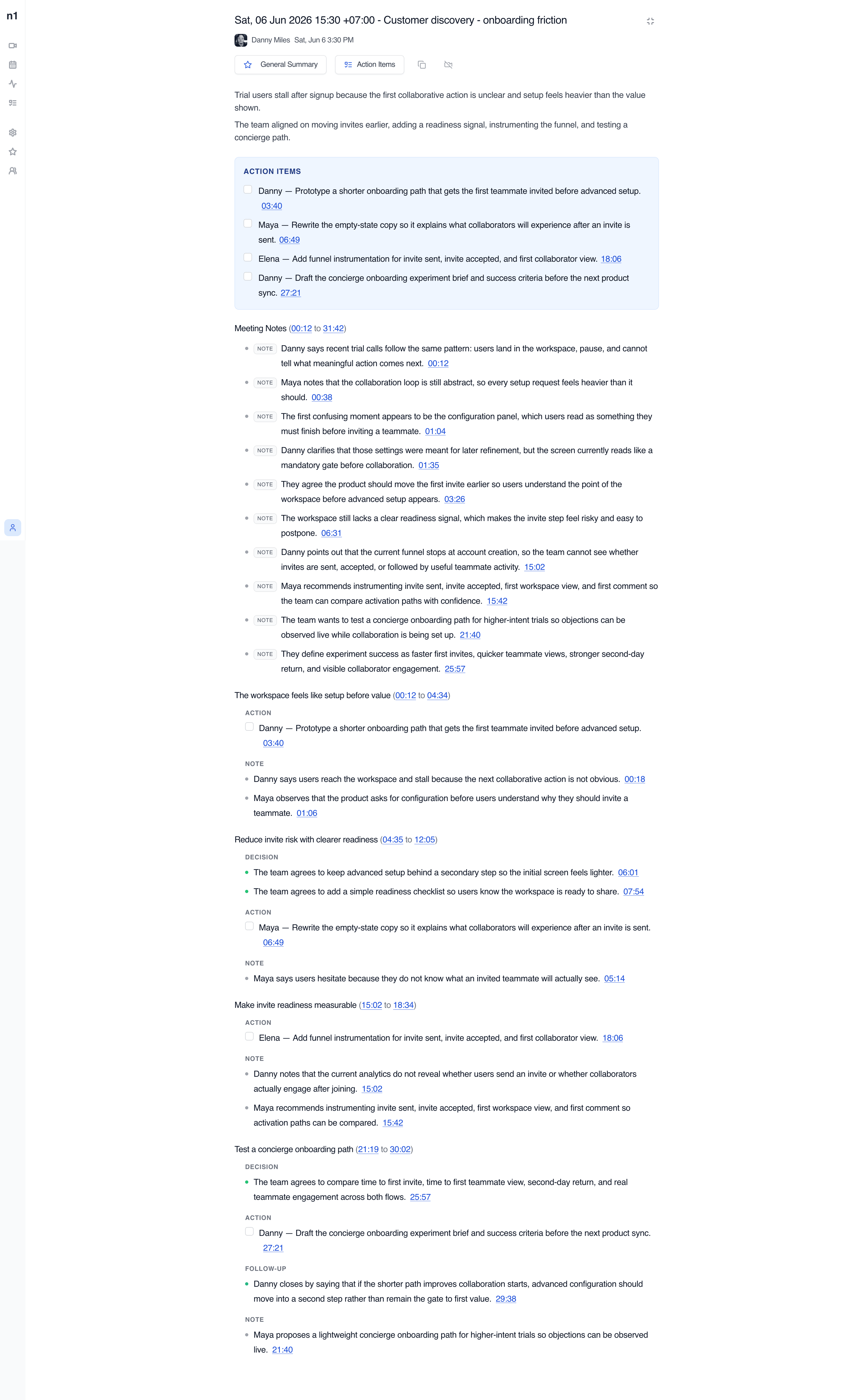
02:14 - 15:32The same meeting summary page your team reviews
Every processed Zoom call becomes a scrollable meeting document with overview context, action items, categorized notes, and links back to exact moments in the recording.
How teams use an AI note taker
Team Meeting Notes
Review team syncs, planning calls, and weekly updates with AI meeting notes, searchable transcripts, and visible follow-ups.
View use caseAI Meeting Assistant for Managers
Catch up on decisions, review action items with source context, and return to the meeting moments that need your attention.
View use caseOne-on-One Meeting Notes
Capture 1:1 conversations with AI summaries, searchable transcripts, action items, Private meeting controls, and Personal notes.
View use caseAI Interview Notes
Revisit candidate answers, interview transcripts, timestamps, and speaker context after Google Meet interviews end.
View use caseSales Call Notes
Capture customer requirements, searchable sales call transcripts, and follow-up actions after Google Meet sales calls.
View use caseProduct Meeting Notes
Turn product reviews and feedback calls into searchable transcripts, decisions, questions, and follow-up context.
View use caseStop taking Zoom notes by hand
note1 joins scheduled Zoom meetings, records the conversation, and turns the processed call into a reviewable summary page with video, action items, categorized notes, questions, topics, and timestamped transcript context.
Meeting notes for the video platforms your team already uses
Focused pages for each meeting platform, without making every page compete for every platform keyword.


Frequently Asked Questions
SupportCan note1 take notes for Zoom meetings?
Yes. note1 supports Zoom calls and can create transcripts, AI summaries, and action items after the meeting is processed. The notes stay attached to the recording, so the summary, transcript, and playback live on one meeting page.
Is note1 a Zoom AI note taker?
Yes. note1 works as an AI note taker for Zoom and also supports Google Meet and Microsoft Teams, so mixed-platform teams can keep every meeting record in one searchable dashboard.
How does note1 join a Zoom meeting?
note1 joins the Zoom call as a visible meeting assistant. You can connect your calendar so scheduled Zoom meetings are joined automatically, or add a specific meeting from the dashboard.
Does a bot join my Zoom calls to take notes?
Yes. The note1 assistant appears in the Zoom participant list like any other attendee, so everyone on the call can see that notes are being taken. There is nothing hidden running in the background.
Can I search Zoom meeting notes?
Yes. Processed meetings include searchable transcript and summary context, so you can find decisions, customer details, and exact wording across past Zoom calls without replaying recordings.
Does note1 extract action items from Zoom calls?
Yes. Action items are pulled out of the conversation with owners and timestamps, collected in a dedicated block on the summary page, and can be tracked from the action items dashboard.
Do Zoom notes include speaker names?
Yes. The transcript is grouped by speaker, and the insights sidebar shows who spoke, how long they talked, the questions asked, and the topics covered in the Zoom meeting.
Does note1 work if my team also uses Google Meet or Teams?
Yes. note1 keeps Zoom, Google Meet, and Microsoft Teams meetings in the same workspace, so meeting history stays searchable in one place regardless of which platform the call happened on.
More AI meeting tools from note1
Explore related meeting note workflows for the same platforms and use cases.
AI note taker for meetings
Compare the complete note1 workflow across supported meeting platforms.
Zoom transcription
Turn Zoom meetings into searchable transcripts and summaries.
Zoom meeting recorder
Record Zoom calls for playback, transcript review, and follow-up.
Zoom meeting notes in Slack
Send processed Zoom recaps to Slack and search past meeting evidence.