AI meeting notes for team syncs, planning calls, and weekly reviews
note1 records Google Meet calls with live meeting transcription and turns each meeting into a searchable summary page with transcript, recording, Prep Notes, decisions, blockers, and action items so your team can move forward without losing context.
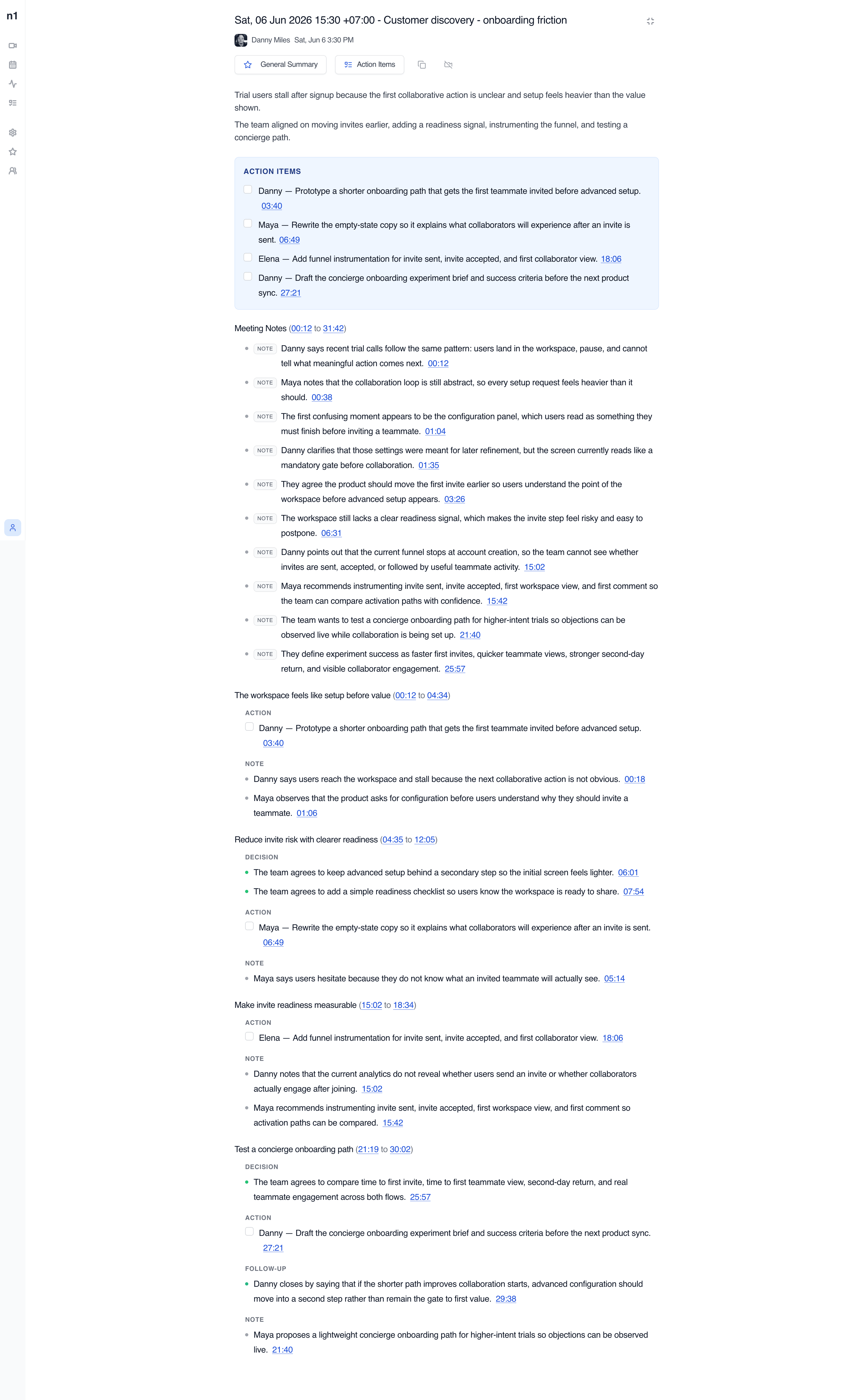
See decisions, blockers, and next steps before replaying the call
note1 opens each team meeting as a structured review page. Instead of hunting through a recording, teammates can start with the AI summary, scan the key outcomes, and jump into the transcript only when exact wording matters. Teams can also send team meeting recaps to Slack after processing.
Summary sections
Group updates, decisions, blockers, and follow-ups into a format the team can scan quickly.
Recording playback
Open the recording beside the recap whenever the team needs more context.
Transcript links
Search the transcript and jump to exact moments from the summary.
Shared review
Keep the meeting recap in one place for teammates who need to catch up later.
Summary sections
Group updates, decisions, blockers, and follow-ups in a format the team can scan quickly.
Timestamp links
Jump from the summary back to the exact moment in the recording when context matters.
Shared context
Keep the recording, transcript, and recap together instead of splitting them across tools.
Transcript
Weekly planning - Google Meet
The handoff still feels unclear after setup, so teams wait too long before inviting collaborators.
Let us tighten the empty state and confirm the owner before the Friday rollout review.
I will rewrite the copy and share the updated checklist with the team right after this call.
Find the exact moment a decision was made
Search the transcript by phrase, speaker, or meeting moment. When a teammate needs to verify wording, ownership, or timing, note1 keeps the original conversation easy to find.
Speaker labels
Know who said what when the meeting includes multiple teammates or stakeholders.
Searchable transcript
Find phrases, blockers, and follow-up context without replaying the entire call.
Playback-linked timestamps
Jump from the transcript back to the recording when the exact exchange matters.
Turn meeting discussion into visible action items
Follow-ups are easier to manage when they stay connected to the meeting that created them. note1 pulls action items into their own section so owners and next steps are clear right after the call.
Owner visibility
Keep responsibility visible after the meeting instead of depending on memory or separate notes.
Checkable follow-ups
Review generated action rows in a task-style format that the team can scan quickly.
Meeting-linked context
Keep each follow-up connected to the source discussion and timestamp.
Action Items
Weekly planning follow-ups
Danny - Confirm rollout owner before Friday planning.
Elena - Share updated launch checklist with the team.
Maya - Document invite friction patterns from this week's calls.
Help teammates catch up without asking for another recap
When someone misses a team sync, they can review the summary, search the transcript, and open the recording from the same page. That cuts down on repeat conversations and keeps the team aligned across recurring meetings.
For a manager and direct report rather than a shared team sync, use AI meeting notes for one-on-one meetings with meeting-specific privacy controls.
Catch up fast
Start with the recap instead of replaying a full recording from the beginning.
Verify exact wording
Search the transcript when a teammate needs to confirm timing, ownership, or the original phrasing.
Reduce repeat discussions
Keep recurring syncs aligned without spending the next meeting re-explaining the last one.
Keep every team meeting reviewable after the call ends
Record the meeting once, then give your team a structured recap with summary notes, searchable transcript context, and follow-ups that do not get lost by the next sync.
Meeting notes for the video platforms your team already uses
Focused pages for each meeting platform, without making every page compete for every platform keyword.


Frequently Asked Questions
SupportDoes note1 work well for recurring team meetings?
Yes. note1 is a strong fit for recurring team syncs, planning calls, weekly reviews, and internal update meetings because it keeps live meeting transcription, the processed summary, recording, transcript, Prep Notes, and action items together after each supported call.
Can teams add agenda or prep notes before a meeting?
Yes. Prep Notes can hold agendas, links, requirements, open questions, and decisions to verify so the team has better source context before and after the meeting.
Can teammates search past team meeting transcripts?
Yes. Processed meetings include searchable transcript content so teammates can find decisions, blockers, phrases, and follow-up context without replaying the full call.
Does note1 show action items from internal meetings?
Yes. note1 can extract action items from processed meetings and keep them visible on the meeting summary page with owner and timestamp context.
Can someone review a meeting they missed later?
Yes. A teammate who missed the call can open the recap, search the transcript, review the action items, and use the recording for deeper context when needed.
More AI meeting tools from note1
Team meeting notes work best when they connect to Prep Notes, live meeting transcription, searchable transcripts, AI summaries, and action items from meetings.