AI note taker and meeting assistant that keeps every note tied to the conversation
note1 records supported meetings, creates searchable transcripts and AI meeting notes, and turns spoken commitments into summaries and action items you can verify against the source.
The customer is ready to move forward once we confirm who owns the security review.
I will take the review and send the answers before Friday. Let’s keep that attached to this call.
I will update the rollout plan as soon as those answers are in.
The cost of an unclear meeting
Microsoft surveyed 31,000 workers across 31 markets for its 2023 Work Trend Index.
Inefficient meetings ranked as the top productivity disruptor.
Said next steps at the end of meetings were unclear.
Said it was difficult to summarize what happened.
What an AI note taker and meeting assistant should solve
The job is to keep the conversation useful while preserving the parts people need afterward.
Stay in the conversation
Capture the discussion without typing through the moments that need your attention.
Keep the exact wording
Use speaker-labelled transcripts and timestamps when a summary needs verification.
Make ownership explicit
Turn spoken commitments into action items connected to the meeting source.
Find the decision later
Search meetings, transcripts, and source moments instead of relying on memory.
How note1 takes meeting notes
Before, during, and after the call, each step stays connected to the same meeting record.
Connect the calendar
Use scheduled meeting context to organize the call under the right workspace.
Choose how to capture
Invite the visible note1 Notetaker, use note1 for Mac, or import an existing recording for notes after processing.
Review one connected record
Open the transcript, summary, action items, speaker context, and playback together.
Overview
- Rollout owner confirmed for launch.
- Checklist update shipping today.
- Beta feedback review moved to Thursday.
Action items
- Share the updated checklist · Danny
- Follow up Friday on launch risk · Elena
- Book the beta review for Thursday · Sam
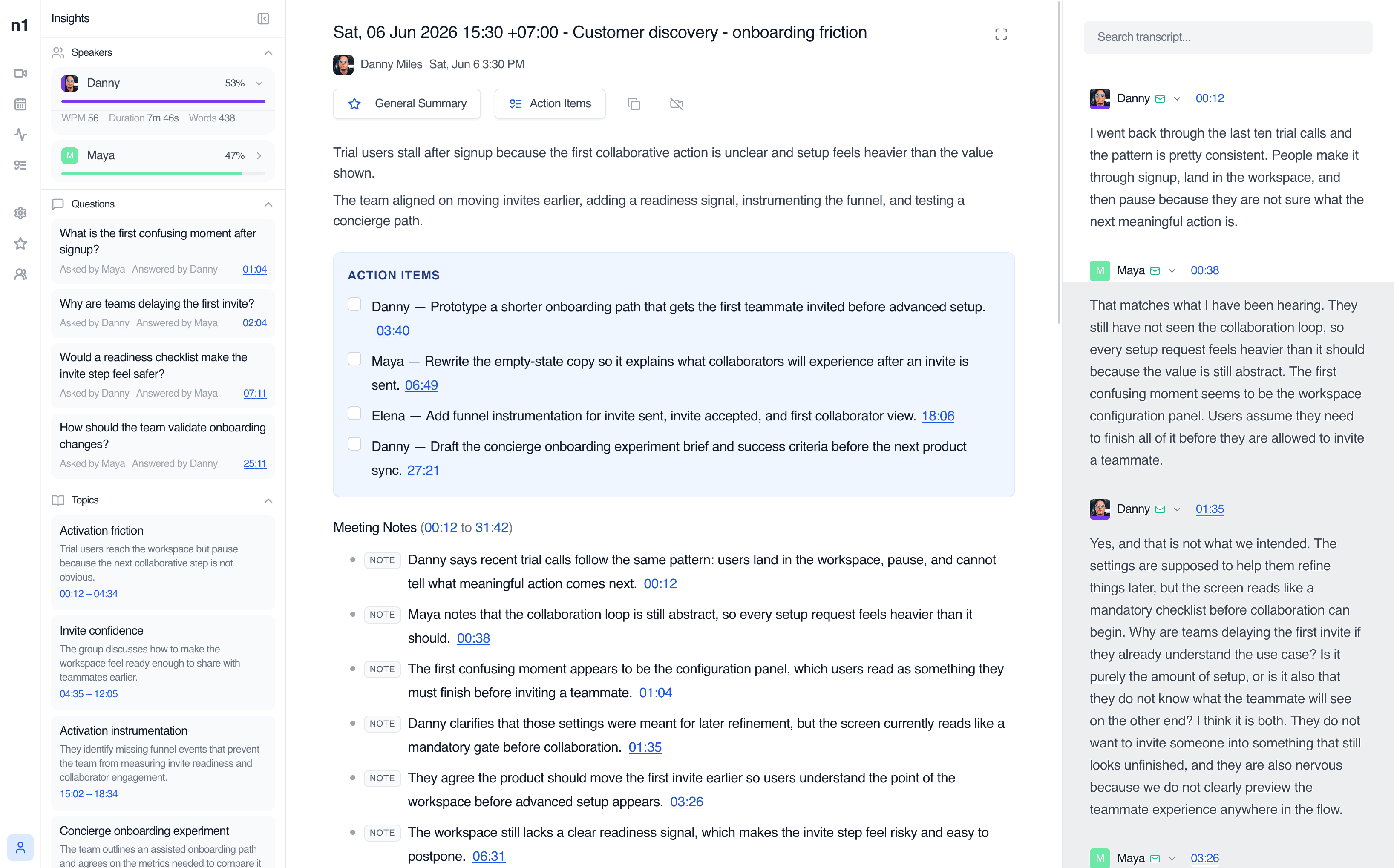
The notes stay beside the source
An AI notes maker can produce a short recap. note1 keeps the recap beside the transcript, action items, speaker insights, and recording so people can check what was said and why it mattered.
More than a meeting transcript
Use the broad meeting record first, then open the specialist workflow when you need more detail.
AI meeting summaries
Start with outcomes, decisions, blockers, and the parts of the conversation that need follow-up.
Learn moreSearchable transcription
Keep the complete conversation available by speaker, phrase, and timestamp.
Learn moreMeeting action items
Connect each owner and next step to the meeting moment that created it.
Learn moreSpeaker identification
Separate voices and confirm who said what before sharing the record.
Learn moreRecording and playback
Return to the exact source moment instead of replaying the entire meeting.
Learn moreMeeting search
Find a decision, phrase, person, or topic across meetings you can access.
Learn moreShared workspaces
Keep meeting records with the team, project, and people who need them.
Learn moreSlack meeting recaps
Send processed meeting recaps to Slack without turning channels into the source of truth.
Learn moreHow to choose the best AI meeting note taker for your team
Vendors describe this category as AI note takers, meeting notetakers, or meeting notes software. The label matters less than how your team captures, checks, shares, and returns to meetings.
Meeting capture
Does it work with the platforms and capture mode your team uses?
Source context
Can you verify notes by speaker, timestamp, transcript, and playback?
Useful outputs
Does it produce summaries, decisions, and action items rather than another wall of text?
Retrieval
Can you search for an exact phrase or decision after the meeting?
Access controls
Can you control who sees the complete record and what stays personal?
Clear consent
Does the workflow make disclosure and recording responsibilities explicit?
Start with a free AI meeting note taker plan
Use the current Free plan to test the complete meeting workflow before choosing a paid plan.
Know what is recorded and who can return to it
Capture method, meeting visibility, and Personal notes answer different questions. note1 keeps those boundaries explicit.
Recording consent
Meeting visibility
Personal notes
How teams use an AI note taker
Team Meeting Notes
Review team syncs, planning calls, and weekly updates with AI meeting notes, searchable transcripts, and visible follow-ups.
View use caseAI Meeting Assistant for Managers
Catch up on decisions, review action items with source context, and return to the meeting moments that need your attention.
View use caseOne-on-One Meeting Notes
Capture 1:1 conversations with AI summaries, searchable transcripts, action items, Private meeting controls, and Personal notes.
View use caseAI Interview Notes
Revisit candidate answers, interview transcripts, timestamps, and speaker context after Google Meet interviews end.
View use caseSales Call Notes
Capture customer requirements, searchable sales call transcripts, and follow-up actions after Google Meet sales calls.
View use caseProduct Meeting Notes
Turn product reviews and feedback calls into searchable transcripts, decisions, questions, and follow-up context.
View use caseMeeting notes for the video platforms your team already uses
Focused pages for each meeting platform, without making every page compete for every platform keyword.


Sources and further reading
Independent research supports the meeting problem. Official platform documentation explains platform behavior. Neither is used as evidence for note1-specific performance.
Frequently Asked Questions
SupportWhat is an AI note taker?
An AI note taker captures a meeting and turns the conversation into a transcript, summary, and follow-up record. note1 also keeps speaker and timestamp context so generated notes remain connected to the source.
What is an AI meeting assistant?
An AI meeting assistant captures a meeting and turns the conversation into a transcript, summary, action items, and searchable record. note1 keeps those outputs connected to speaker, timestamp, and playback context so people can verify what was said.
Is there a free AI meeting note taker plan?
Yes. The note1 Trial includes 3 meetings per month, 180 transcription minutes, live transcription, AI summaries, and speaker identification. Check the pricing section for current plan details.
How should I choose the best AI meeting note taker?
Compare capture methods, supported platforms, transcript and speaker context, summary quality, action-item evidence, search, playback, access controls, and consent behavior. The best fit depends on how your team records and reviews meetings.
Does note1 work with Google Meet, Microsoft Teams, and Zoom?
Yes. note1 supports meeting-note workflows for Google Meet, Microsoft Teams, and Zoom.
Can note1 record without adding a bot?
Yes. The note1 Mac app can capture supported meetings without joining as a participant. You can also use the visible note1 Notetaker when that capture workflow fits the call.
Can I verify AI-generated meeting notes?
Yes. note1 keeps generated summaries and action items beside searchable transcripts, timestamps, speaker context, and recording playback.
Who can see a meeting in note1?
Meeting visibility applies to the complete record. Private meetings are available to identified participants and workspace members explicitly added as viewers. Personal notes are visible only to their author.
More AI meeting tools from note1
Go deeper into the specialist workflows behind note1 meeting notes.
AI meeting summaries
See how note1 structures recaps, decisions, and source-linked notes.
Meeting transcription
Review searchable transcripts with speaker and timestamp context.
Bot-free meeting notes
Capture supported meetings from the note1 Mac app without adding another participant.
Meeting action items
Keep owners, next steps, and source moments connected.
Leave the meeting with a record you can use
Stay in the conversation while note1 handles the transcript, summary, action items, and source context.
Start using note1