 Google Meet AI notes
AI note taker for Google Meet that keeps every call reviewable
note1 links your scheduled Meet calls to searchable transcripts, structured summaries, and owned follow-ups. Choose a meeting on your calendar, stay in the discussion, and review the result afterward.
Agenda for Monday
3 scheduled Google Meet calls
Team sync
10:00 - 10:30
Launch readiness
13:00 - 13:45 - meet.google.com/launch
Design review
16:00 - 16:30
Recap ready
- 1 decision confirmed
- 1 blocker flagged
- 1 action with an owner
From scheduled Meet to useful notes
Connect your calendar before the call, let note1 capture the discussion, then review the finished notes when the meeting is processed
Choose the Google Meet from your calendar
Connect Google Calendar, review upcoming Meet calls, and choose which scheduled conversations note1 should capture.
Stay in the Meet while note1 records
note1 appears as a visible meeting participant and captures the call after admission where the meeting requires it.
Open the finished meeting record
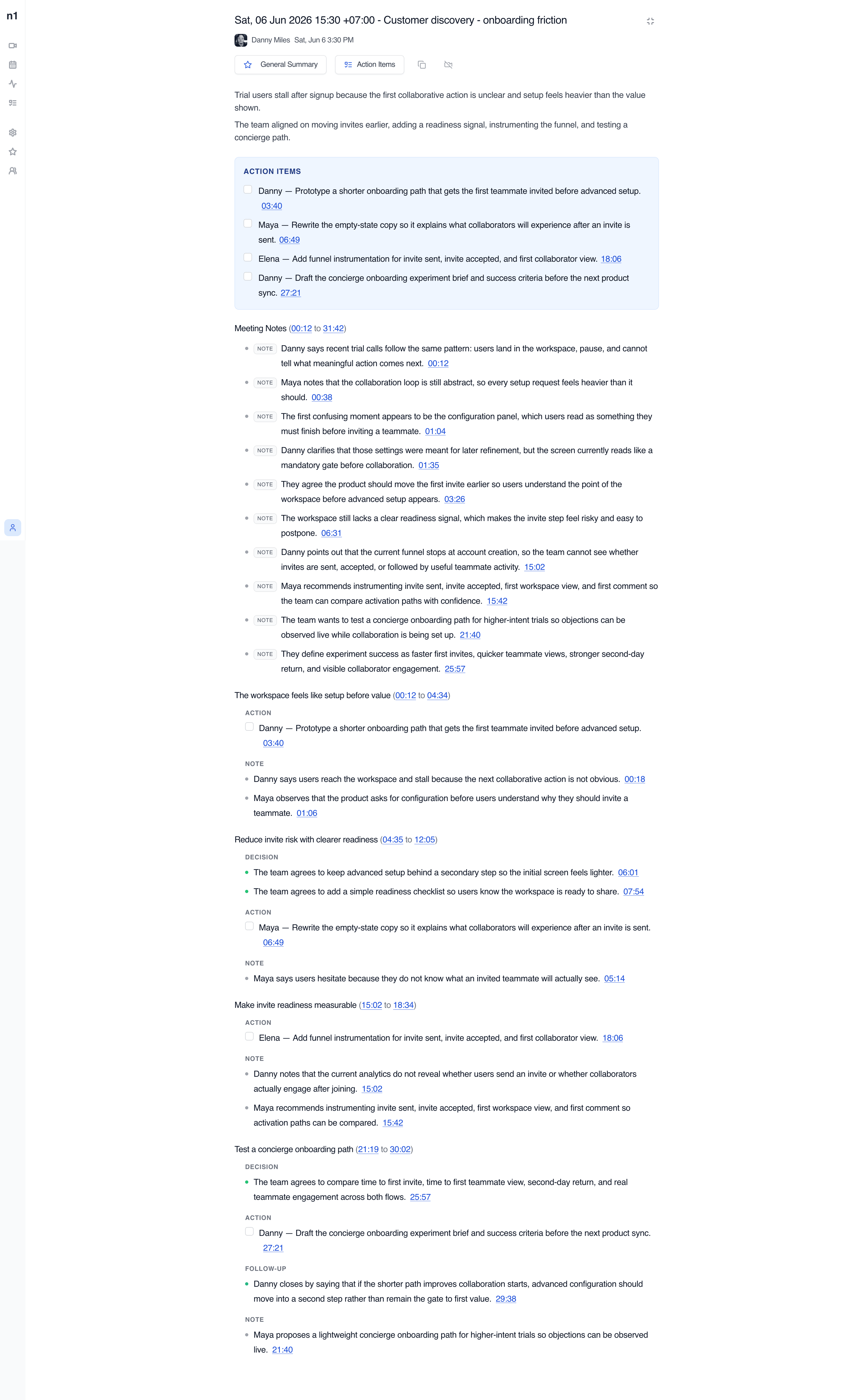
Review playback, a searchable speaker-labeled transcript, structured summary sections, questions, topics, and owner-tagged actions after processing.
Bring context into the call
A Google Meet link on its own says nothing about what the meeting needs to resolve. note1 keeps the scheduled event, agenda, and Prep Notes attached to the call, so the questions you need answered are already there when it starts.
Because the meeting comes from Google Calendar, the event remains the reference point for the recording, transcript, and recap.
Launch readiness
meet.google.com/launch
Agenda
Prep Notes
- What can still move Friday's launch?
- Who owns the final QA pass?
Search the conversation, verify the source
The processed Meet call becomes a searchable transcript with speaker labels and timestamps. When you need to check a summary, open the linked transcript timestamp.
Search works across past meetings too, so a question like "who took QA ownership?" has an answer with evidence instead of a guess.
The release date can stay Friday, but we still need a named QA owner.
I will confirm the QA owner before Friday and update the release checklist.
Which release checks still need sign-off before the stakeholder review?
The extracted action links back to Danny's exact transcript moment at 07:48.
A recap organized for follow-through
A Google Meet mixes decisions, blockers, and open questions into one conversation. The AI summary pulls them apart, so what was decided, what is stuck, and what still needs an answer are separate at a glance.
Action items carry an owner and a timestamp, so the follow-up belongs to a person, not to the meeting.
Launch readiness - recap
Ready- DecisionLaunch date remains Friday.03:26
- BlockerQA ownership is unresolved.04:12
- QuestionWhich release checks still need sign-off?09:44
- ActionDanny confirms the QA owner before Friday.07:48
Choose how note1 captures Google Meet
If you already have the meeting file, import a saved Meet recording instead. Download the recording you have access to, then select it in note1 to get notes after processing.
Visible meeting assistant
note1 joins the scheduled Meet as a visible participant and records the conversation after it is admitted where the meeting requires admission. Everyone on the call can see that notes are being taken.
Bot-free capture on Mac
On eligible Apple Silicon Macs, the note1 desktop app records the Meet audio locally, without adding note1 to the participant list.
Whichever mode you use: always disclose the recording and obtain consent where required.
The meeting record your team reviews
Every processed Google Meet becomes a meeting document with context, action items, categorized notes, and links back to the source transcript.
How teams use an AI note taker
Team Meeting Notes
Review team syncs, planning calls, and weekly updates with AI meeting notes, searchable transcripts, and visible follow-ups.
View use caseAI Meeting Assistant for Managers
Catch up on decisions, review action items with source context, and return to the meeting moments that need your attention.
View use caseOne-on-One Meeting Notes
Capture 1:1 conversations with AI summaries, searchable transcripts, action items, Private meeting controls, and Personal notes.
View use caseAI Interview Notes
Revisit candidate answers, interview transcripts, timestamps, and speaker context after Google Meet interviews end.
View use caseSales Call Notes
Capture customer requirements, searchable sales call transcripts, and follow-up actions after Google Meet sales calls.
View use caseProduct Meeting Notes
Turn product reviews and feedback calls into searchable transcripts, decisions, questions, and follow-up context.
View use caseMake your next Google Meet searchable
Pick the scheduled meeting on your calendar, and note1 handles the rest: capture, transcript, structured recap, and follow-ups with owners and timestamps.
Meeting notes for the video platforms your team already uses
Focused pages for each meeting platform, without making every page compete for every platform keyword.


Frequently Asked Questions
SupportCan note1 take notes in Google Meet?
Yes. note1 captures scheduled Google Meet calls and turns each one into a processed meeting record with playback, a searchable transcript, AI summary sections, questions, topics, and action items.
How does note1 join a Google Meet?
note1 joins the scheduled Meet call as a visible meeting assistant. It appears in the participant list like any other attendee, and in meetings that require admission it waits until someone lets it in.
Does note1 work with Google Calendar?
Yes. Connect Google Calendar once and scheduled Meet calls appear in note1, so you can choose which conversations to capture and keep the event, prep context, and finished notes together.
Does a visible meeting assistant join the participant list?
Yes. When note1 captures a Meet call this way, everyone can see it in the participant list. Nothing records silently in the background.
Can I take Google Meet notes without a bot?
Yes. On eligible Apple Silicon Macs, the note1 desktop app records the meeting audio locally without adding note1 to the participant list. You should still disclose the recording and obtain consent where required.
Do the notes include speaker names and timestamps?
Yes. After processing, the transcript is grouped by speaker with timestamps, and summary bullets link back to their source timestamps.
Does note1 extract decisions and action items from Meet calls?
Yes. The generated recap can separate decisions, blockers, questions, and topics, and action items are extracted with owners and timestamp links back to the source moment.
Do I need Google Meet's native recording feature?
No. note1 captures and processes the meeting itself, so you do not need an eligible Workspace plan for Google's built-in recorder. note1's meeting record lives in note1 and is separate from Google's native Drive recording.
More AI meeting tools from note1
Explore related Google Meet recording, transcript, and note tools.
Google Meet transcription
Search speaker-labeled Meet transcripts and verify the source.
Google Calendar meeting notes
Keep scheduled events, prep context, and meeting follow-up together.
AI note taker for meetings
Compare note1 across supported meeting platforms.
How to record a Google Meet
Compare native recording, local capture, and AI meeting assistants.