
Granola vs note1.ai: Features, Pricing and Limits Compared

Updated on November 26, 2026 with Granola's current plans and features.
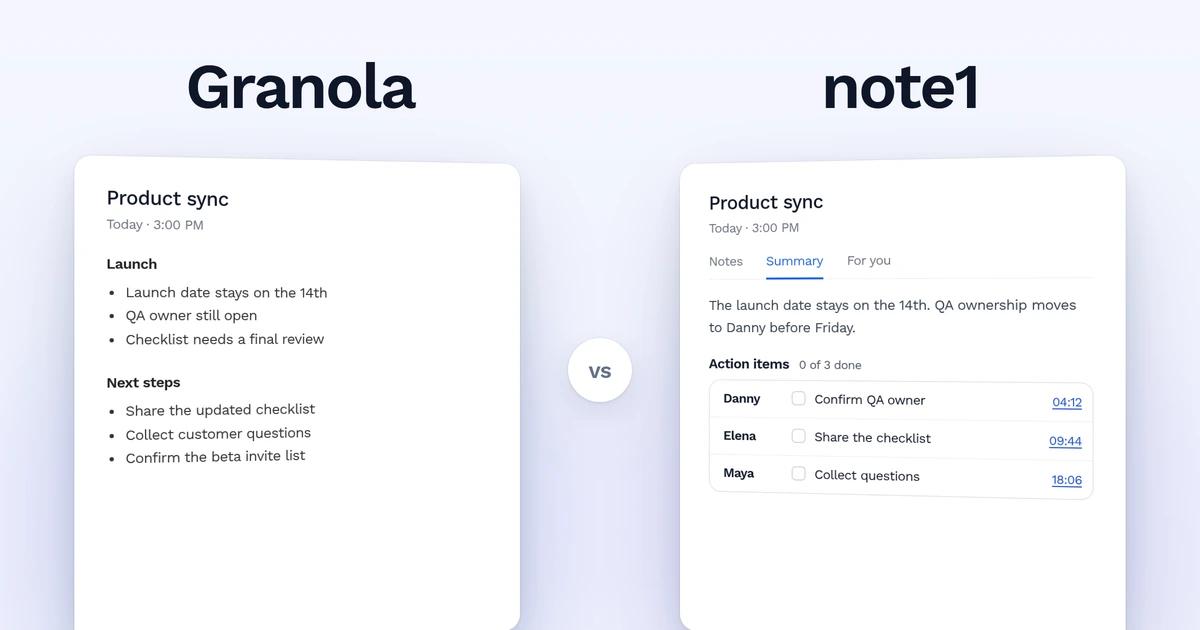
Granola and note1.ai both turn a meeting into notes without asking you to type everything yourself. They start from different ideas. Granola works as a notepad. You write rough notes, and it enhances them with the transcript once the call ends. note1.ai keeps a meeting record. It holds the recording, transcript, shared summary and assigned action items together, and helps you during the call with the points you prepared.
This comparison uses the same four criteria for both products: how they capture a meeting, what help you get while it is happening, what you have afterward, and what the plans include.
This article is published by note1.ai and includes our product. Details were checked against official pages in November 2026; it compares documented features and plans, and we did not run hands-on accuracy tests. Granola sources are granola.ai, its pricing page and its help center; note1.ai details come from our current product and pricing. Where a capability is not documented, we mark it as unknown.
Short answer
Granola fits people who like writing their own notes, want AI chat during the call, work on Windows or mobile, or want a free plan; it deletes meeting audio after transcription. note1.ai fits teams that need the original recording later, uploads of existing recordings, suggestions during the call based on prepared talking points, and action items with owners.
On price, Granola Business is $14 per user per month and Granola Basic is free. note1.ai Pro is $16 monthly ($12 billed annually) with a 14-day trial and no free plan.
Granola vs note1.ai at a glance
| Criterion | Granola | note1.ai |
|---|---|---|
| Capture | Bot-free device audio on macOS and Windows; iOS and Android apps for in-person notes | Visible Notetaker for Google Meet, Zoom and Teams, or bot-free recording with note1.ai for Mac |
| Existing recordings | No import or upload of pre-recorded audio | Upload audio or video recordings for transcription and notes |
| Help during the meeting | Granola Chat answers questions mid-call; pre-meeting briefs on Business and Enterprise | Live AI Assistant suggests what to say or ask, tracks your prepared talking points and reminds you of earlier commitments; Ask note1 answers typed or spoken questions |
| After the meeting | Enhanced notes built from your notes and the transcript, with source quotes; templates, recipes, follow-up emails | Shared summary, action items with owners and timestamps, playback of the recording, meeting search and Ask note1 |
| Audio | Not retained: audio is deleted after transcription | Recording kept 1 year on Pro, for as long as you subscribe on Business |
| Free option | Basic plan, free, with 30 days of visible history | No free plan; 14-day trial of Pro or Business |
Capture: devices, bots and uploads
Granola runs on your computer and captures system audio and your microphone, so no bot joins the call. Its transcription guide says this works with Zoom, Google Meet, Teams and other desktop calling apps. The desktop app is available for macOS and Windows, and the iPhone and Android apps cover in-person conversations. The mobile apps cannot capture audio from virtual meeting apps, and the web app only views and edits existing notes. Speaker tags use participants' display names in Meet, Zoom and Teams on desktop; otherwise the transcript separates "Me" from "Them".
Two limits are explicit in the same guide. Granola does not support importing or uploading pre-recorded audio files, and it does not record or save meeting audio or video, so there is nothing to play back later.
note1.ai gives you two ways to capture a live call. The Notetaker joins Google Meet, Zoom or Microsoft Teams as a visible participant, and can join automatically from your Google or Outlook calendar. note1.ai for Mac records without a bot, including in-person meetings, on Apple Silicon Macs with macOS 15 or later. Bot-free does not mean offline. The Mac app streams audio to note1.ai's servers for the live transcript, and uploads the recording afterward for the final transcript, summary and action items.
For calls note1.ai never joined, you can upload a recording (MP3, WAV, M4A, FLAC, OGG, MP4, MOV, WebM or MKV) and get a transcript, summary and action items once it is processed. note1.ai has no Windows or mobile app. On Windows, the options are the Notetaker or uploading a file afterward; for in-person meetings without a Mac, record on your phone and upload.
Speaker identification combines voice separation with participant and calendar context, and you can correct names.
Help during the meeting
Both products help during the call, but in different ways.
Granola Chat sits at the bottom of a note on desktop, iOS and Android. Its chat guide lists asking it to catch you up on what you missed, recap action items or explain a complex topic during a meeting. You can also keep writing your own notes, which later shape the enhanced version.
Before the call, Granola's pre-meeting briefs prepare two or three bullet points for external meetings: open threads, relevant context from earlier notes, the web, your calendar and, if connected, Gmail. Briefs require a Business or Enterprise plan with Google Calendar connected, and are not generated for meetings with only colleagues.
note1.ai's Live AI Assistant follows the live transcript and offers short suggestions without being asked:
- what you might say or ask before the topic moves on;
- reminders of decisions and commitments from recent related meetings;
- questions directed at you, and work connected to your responsibilities;
- a checklist built from your Personal notes, so you can cover the points you prepared.
For example, someone writes their standup update in Personal notes beforehand. The assistant condenses it into talking points, shows which ones seem covered, reminds them of points they meant to mention and picks up highlights as the discussion moves. It also uses the shared agenda and a limited amount of context from recent meetings with the same link or participants. It will not catch every point, it has no chat box, and it does not speak for you.
To ask a question mid-call, use Ask note1: type it in the dashboard or the Mac window, or say "hey note1" on the Mac. It can answer about the meeting in progress as well as earlier ones, with sources.
Requirements: the Live AI Assistant runs in the note1.ai for Mac window, for meetings recorded on the Mac or calls the Notetaker joined. An uploaded past recording gets notes once it is processed; the assistant only runs during a live call.
After the meeting: notes, record and collaboration
Granola's enhanced notes are generated when the call ends, from the transcript, your private notes, calendar details and your profile. Points from your own notes are highlighted, and you can open the transcript quotes behind any line. You can edit the result, switch templates, regenerate, or ask Chat to rewrite a section. Notes are private by default and can be shared with participants, by link, or in shared folders. Business adds follow-up emails and integrations with Notion, Zapier, HubSpot, Attio and Affinity; Slack works on every plan. MCP and an API let other AI tools read your notes. A CSV export from Settings gives titles, summaries and transcripts.
note1.ai writes a shared summary from the transcript and the shared agenda, in a style you choose (for example Standup, 1:1 or Sales Call). Personal notes guide your assistant and stay private; they are not fed into the shared summary. Action items come with owners and a timestamp that opens the moment they were said, and can be sent to Linear, Jira, GitHub, Asana, Trello, Todoist, Motion or Notion. Only the action items are sent; the summary stays in note1.ai. Playback keeps the recording next to the transcript.
To find something later, meeting search matches exact words and meaning, and Ask note1 gives cited answers in the dashboard, in Slack or on the Mac. Workspaces and meeting visibility control who sees what. You can download the transcript and summary as JSON files, and the audio or video recording.
Granola keeps a polished text record shaped by your own notes. note1.ai keeps the audio and video too, so a teammate can replay the exact exchange behind a decision or task.
Granola pricing vs note1.ai plans
Prices are per user per month in USD, as listed on each company's pricing page in November 2026. Check Granola's pricing and note1.ai pricing for current details.
| Granola Basic | Granola Business | Granola Enterprise | note1.ai Pro | note1.ai Business | |
|---|---|---|---|---|---|
| Price | Free | $14, billed monthly | From $35; monthly or annual | $16 monthly, or $12 billed annually | $28 monthly, or $21 billed annually |
| Trial | Free plan | Time-limited trials mentioned in billing guide | Time-limited trials mentioned in billing guide | 14-day trial, card required | 14-day trial, card required |
| Transcription | No daily limit listed | No daily limit listed | No daily limit listed | 3,000 minutes and 60 meetings a month, up to 4 hours each | Unlimited minutes, meetings and length (fair use) |
| History | Last 30 days visible in the app | Unlimited | Unlimited | Notes, transcripts and action items kept while you subscribe | Same |
| Audio and video | Deleted after transcription | Deleted after transcription | Deleted after transcription | Recordings kept 1 year | Recordings kept while you subscribe |
| Uploads | Not supported | Not supported | Not supported | Audio and video uploads, counted toward the 3,000 monthly minutes | Audio and video uploads |
| AI questions | Chat, Auto model only | Chat with model choice | Chat with model choice | 3M Ask note1 tokens a month, shared by the team, plus MCP for any AI model | Unlimited Ask note1 (fair use), plus MCP for any AI model |
| Integrations | Slack; MCP for last 30 days | Notion, Zapier, HubSpot, Attio, Affinity, MCP, API | Adds Salesforce and admin controls | Slack, MCP, task tools for action items | Same, plus topic trackers |
| Admin and SSO | None | Central billing, user management | SSO (50+ users), SCIM, audit API | Workspaces, meeting visibility, admin-managed billing | Same |
A few points the table compresses:
- Granola bills per workspace: every active member of a workspace is a paid seat on the same plan. Its mobile apps are free on every plan.
- On Granola Basic, older notes are hidden after 30 days, not deleted, and come back after an upgrade.
- note1.ai minutes and meetings are allowances per seat, and everyone who records needs a seat. On Pro, uploaded recordings count toward the same 3,000 monthly minutes as recorded meetings. Annual note1.ai plans save 25%, and the first payment has a 30-day money-back guarantee.
- If a note1.ai subscription ends, the workspace stays readable for 30 days and is then deleted.
Where Granola is the stronger fit
- You work on Windows, or want the same app on Mac, Windows, iPhone and Android.
- You like writing your own notes and want AI to build on them.
- You want to ask an AI chat questions during the call.
- You prepare for many external meetings and want an automatic brief with web and email context.
- You want a free plan for occasional use, or prefer that meeting audio is not kept.
Where note1.ai is the stronger fit
- You need the original recording later, to replay a decision or share the exact moment.
- You transcribe recordings from calls you did not attend, such as a colleague's interview or a phone recording.
- You want suggestions during the call that follow your prepared talking points and earlier commitments, without having to stop and ask.
- Your team tracks follow-ups in Linear, Jira, Asana or a similar tool and wants action items with owners and timestamps.
- You prefer a visible Notetaker for some calls and bot-free Mac recording for others.
Frequently asked questions
How much does Granola cost compared with note1.ai?
Granola lists Basic as free, Business at $14 per user per month, and Enterprise from $35. note1.ai Pro is $16 per seat per month ($12 billed annually) and Business is $28 ($21 billed annually), each with a 14-day trial. The plans also cover different things. Granola keeps text only, while note1.ai keeps recordings and accepts uploaded files.
Can Granola transcribe a file I already recorded?
No. Granola's documentation says it is built for live meetings and does not support importing pre-recorded audio. note1.ai accepts audio and video uploads.
Does Granola keep meeting recordings?
No. Granola states that audio passes to its transcription provider in real time and is not saved. note1.ai keeps recordings for 1 year on Pro and for as long as you subscribe on Business.
Does note1.ai work without a bot?
Yes, with note1.ai for Mac on Apple Silicon and macOS 15 or later. Audio is still processed on note1.ai's servers. On other computers, use the Notetaker or upload a recording.
Can I move my Granola notes to note1.ai?
Granola can export a CSV of your notes from Settings. note1.ai does not import that CSV into meeting records, so keep it as a separate archive.
Choosing between them
Pick based on your devices and what you need to keep. If you want a notepad on every platform and are fine with a text-only record, Granola covers that well. If you need recordings, uploads, assigned follow-ups and live help built around what you prepared, note1.ai fits that workflow.
For other options, see Granola AI alternatives, the Otter vs note1.ai comparison, MacWhisper alternatives for Mac transcription apps, and the best AI meeting assistants. Plans and the trial are on the pricing page.