
Decision log template for meetings: fields, examples and how to keep it current

A decision log is a running list of the decisions a team has made, with the date, the owner, the reason and a link to where it was agreed. It answers one question that meeting notes rarely answer well months later: "Why did we decide this, and who decided?"
This post gives you a decision log template you can copy into a spreadsheet, a doc or Notion, explains each field, shows filled-in examples, and sets out a short routine for keeping meeting decisions current. At the end there is a section on how note1.ai helps you find decisions in recorded meetings.
Short answer
A decision log template for meetings needs five core fields: Decision (one sentence, stated as the outcome), Date, Owner (one accountable person), Source (a link to the meeting or the moment it was agreed) and Status (Proposed, Agreed, Superseded or Reversed). Add context, alternatives considered, a revisit date and related items when you need them.
Keep it current by copying each decision into the log within a day of the meeting, and never delete an entry: mark it Superseded and link the new one. note1.ai doesn't keep a decision log for you, but its summaries tag decisions with a time range you can use as the Source.
What is a decision log?
A decision log (also called a decision register or decision record) is one shared place where a team writes down each decision once. Each entry is short: what was decided, when, by whom, why, and what else was considered.
It is different from the other things you keep after a meeting:
| Document | What it records | How long it matters |
|---|---|---|
| Meeting notes or minutes | Everything discussed in one meeting | Mostly until the next meeting |
| Action item list | Tasks, owners and due dates | Until the task is done |
| Decision log | Choices the team committed to, across all meetings | Until the decision is reversed or no longer relevant |
Meeting notes are organised by meeting. A decision log is organised by decision. So when someone asks why the pricing page lists annual plans first, you search one log instead of reading twelve sets of notes.
Why meeting decisions get lost
Most teams do make decisions in meetings. The problem is what happens next:
- The decision is spoken but never written down, so people remember it differently.
- It is written in the notes of one meeting, under a heading nobody searches for.
- The reasoning is missing, so a new teammate reopens a settled question.
- A later meeting changes the decision, and the old version is still the one people find.
A decision log fixes these by giving every decision a fixed home, a reason and a status.
What to capture in a decision log
You can start with five fields and add more when you need them. These are the fields worth considering, in order of importance.
| Field | What to write | Example |
|---|---|---|
| ID | A short number so people can refer to it | D-014 |
| Decision | One sentence, stated as the outcome | Move the mobile release to 4 December |
| Date | When the decision was made | 2026-11-24 |
| Owner | The one person accountable for the decision | Priya (product lead) |
| Context | Why the question came up, in one or two lines | QA found a payment bug on Android 15 |
| Alternatives considered | Options that were rejected and why | Ship on time without Android payments (rejected: support risk) |
| Source | Link to the meeting, notes or exact moment where it was agreed | Release sync, 24 Nov, 12:40 in the recording |
| Status | Proposed, Agreed, Superseded, Reversed | Agreed |
| Revisit date | When to check whether the decision still holds | 2026-12-08 |
| Related items | Action items, tickets or later decisions | Jira MOB-482; superseded by D-021 |
A few rules make the fields work:
- Write the decision as an outcome. Write "Release moves to 4 December" instead of "Discussed release timing".
- Name one owner. If three people own it, nobody does.
- Always add the source. A link to the meeting or the moment in the recording ends most "that's not what we agreed" debates quickly.
- Never delete an entry. When a decision changes, mark the old one Superseded and link the new one. The history is part of the value.
Decision log template: copy-paste versions
Pick the format that matches where your team already works. All three use the same fields.
Table template (spreadsheet or Markdown)
Paste this into Google Sheets, Excel or any Markdown editor. In a spreadsheet, put each column header in its own cell.
| ID | Decision | Date | Owner | Context | Alternatives considered | Source | Status | Revisit date | Related |
|----|----------|------|-------|---------|-------------------------|--------|--------|--------------|---------|
| D-001 | | | | | | | Agreed | | |
Plain text template
Use this in a doc, an email or a Slack channel pinned for decisions. One block per decision.
Decision D-___: [the decision, stated as an outcome]
Date: [YYYY-MM-DD]
Owner: [one name]
Context: [why this came up]
Alternatives considered: [option, and why it was rejected]
Source: [meeting name, date, link to notes or recording timestamp]
Status: [Proposed / Agreed / Superseded / Reversed]
Revisit date: [YYYY-MM-DD or "none"]
Related: [tickets, action items, later decisions]
Notion or Google Docs template
In Notion, create a database with these properties: Decision (title), Date (date), Owner (person), Status (select: Proposed, Agreed, Superseded, Reversed), Revisit date (date), Source (URL) and Related (relation or text). Put the context and alternatives in the page body, so each decision opens as its own page.
In Google Docs, use a heading per decision so the outline in the sidebar becomes a clickable index:
## D-014 Move the mobile release to 4 December
Date: 2026-11-24 | Owner: Priya | Status: Agreed | Revisit: 2026-12-08

Context: QA found a payment bug on Android 15 two days before release.
Alternatives considered: Ship on time with Android payments disabled
(rejected: support load and refund risk).
Source: Release sync, 24 Nov, link to recording at 12:40.
Related: Jira MOB-482
Decision log examples
Here are three filled-in entries from different kinds of meetings.
Product decision
Decision D-031: Annual plans are shown first on the pricing page
Date: 2026-10-02
Owner: Marta (growth)
Context: Most new trials pick monthly; annual retention is higher.
Alternatives considered: Discount banner on monthly plan
(rejected: harder to test cleanly).
Source: Growth weekly, 2 Oct, summary section "Pricing page"
Status: Agreed
Revisit date: 2026-12-01, after one full billing cycle
Related: Design ticket WEB-210
Engineering decision
Decision D-032: Use Postgres full-text search instead of a separate search service
Date: 2026-10-09
Owner: Tom (backend lead)
Context: Search volume is low and the team is small.
Alternatives considered: Dedicated search cluster
(rejected: extra infrastructure to run for little gain right now).
Source: Architecture review, 9 Oct, recording at 31:15
Status: Agreed
Revisit date: When search requests pass 50 per second
Related: Linear ENG-778
Decision that was later changed
Decision D-019: Customer onboarding calls are optional for Starter accounts
Date: 2026-08-14
Owner: Lena (customer success)
Status: Superseded by D-027 (onboarding calls required for accounts with 10+ seats)
Notice that the superseded entry stays in the log. Anyone who finds D-019 sees immediately that it no longer applies and where to look instead.
How to keep a decision log updated after meetings
A decision log only helps if it is current. This routine takes a few minutes per meeting.
- Say decisions out loud in the meeting. When a choice is made, the facilitator repeats it in one sentence: "So we're agreed: the release moves to 4 December, Priya owns it." That sentence becomes the log entry.
- Mark decisions in the notes as they happen. Prefix them with "Decision:" so they are easy to pull out afterward, whether you take notes by hand or use an AI note taker. The guide to meeting notes that drive action uses the same labels.
- Update the log within a day. Copy each decision into the log with its owner and source link. Waiting a week means context is already fading.
- Check for conflicts. Before adding a decision, search the log for the same topic. If an older entry exists, mark it Superseded and link the two.
- Review revisit dates. Once a month, or at the start of a planning meeting, look at entries whose revisit date has passed and confirm, change or retire them.
- Link actions separately. A decision often creates tasks. Put those in your task tool and link them in the Related field, so the decision log stays a list of decisions. The guide to turning meeting recordings into action items covers that part.
Who should own the log? One person per team, usually the team lead, project manager or whoever runs the recurring meeting. Anyone can propose an entry, but one person keeps it tidy.
Common mistakes with decision logs
- Logging discussions instead of decisions. If the outcome is "we'll think about it", log it as an open question and track it separately.
- Too many fields. Teams that start with twelve required columns stop filling them in. Start with Decision, Date, Owner, Source and Status.
- No source link. Without it, the log is just another set of claims.
- Keeping it private. A log only one person can see does not settle questions for anyone else.
- Never revisiting. Some decisions are meant to be temporary. A revisit date makes that explicit.
How note1.ai helps you capture meeting decisions
note1.ai does not keep a separate decision log for you. It does make filling and checking one much faster, because the decisions and their sources are already in your meeting record.
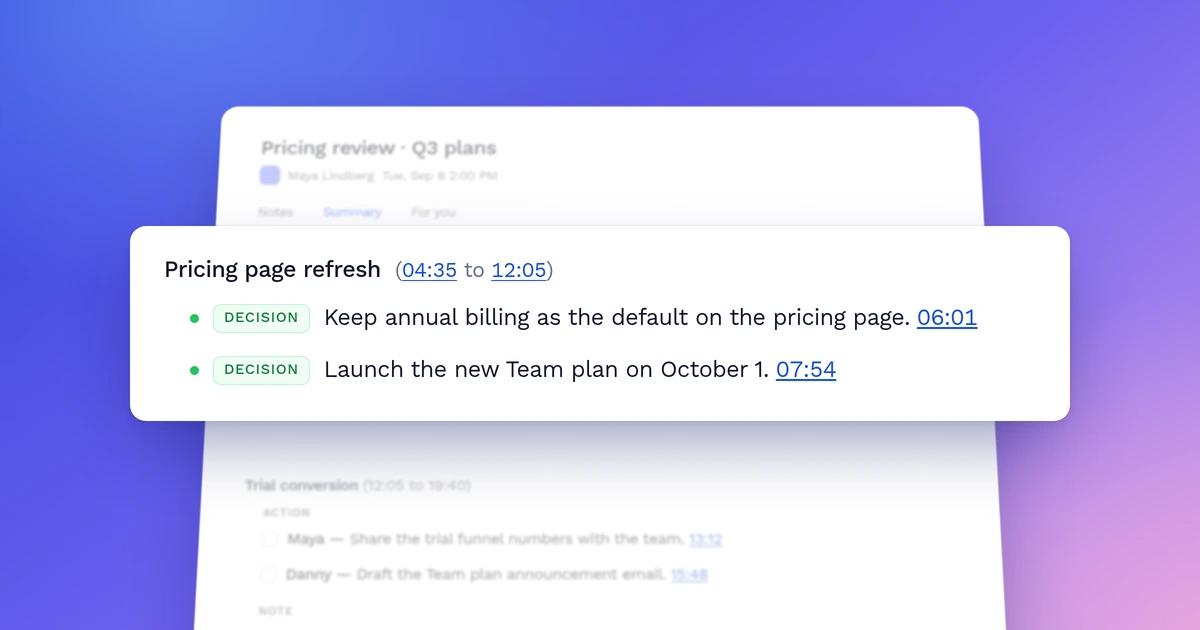
- Decisions are tagged in the summary. When note1.ai records a meeting through its Notetaker for Google Meet, Zoom or Teams, the Mac app, or an uploaded recording, the AI meeting summary marks bullets by type, such as Decision, Action, Risk or Blocker. Each section has a time range: press the time to play the recording from that moment and jump the transcript there. That time is your Source field.
- Outcomes show how many decisions a meeting produced. The Insights panel counts Decisions, Tasks and Open questions, and pressing a count jumps to those items in the summary.
- Copy the summary into your log. The copy button copies the summary, so you can paste the decisions into your spreadsheet, doc or Notion page and keep only what belongs in the log.
- Search across meetings. Meeting search looks through titles, transcripts, summaries, action items and notes in every meeting you can open, and opens a result at the matching moment. That is useful for step 4 above, checking whether a topic was already decided.
- Ask about past decisions. Ask note1 answers questions such as "What did we decide about the release date in November?" across one meeting or many, with sources you can press to jump to the moment. Check the source before you copy an answer into the log.
- Open loops lists recent decisions. The Open loops page and its optional email or Slack digest include a Decisions section alongside open action items and unanswered questions, which works as a weekly prompt to update your log.
- Action items go to your task tool. Action items from a meeting can be linked to Linear, Jira, GitHub, Asana, Trello, Todoist, Motion or Notion, which covers the Related field without mixing tasks into the decision log. Only action items are sent; the full notes stay in note1.ai.
For more ways to structure notes so decisions stand out, see AI meeting notes: 12 examples, templates and best practices. Plans and limits are on the pricing page.
FAQ
What should a decision log include?
At minimum: the decision stated as an outcome, the date, one owner, a link to where it was agreed, and a status. Context, alternatives considered and a revisit date make it much more useful later.
What is the difference between a decision log and meeting minutes?
Minutes record what happened in one meeting, and a meeting summary gives the short version. A decision log records decisions across all meetings in one list, with their reasons and status, so you can find a decision without knowing which meeting it came from.
Where should a team keep its decision log?
Wherever the team already works: a shared spreadsheet, a Notion database, a Google Doc or a pinned page in your wiki. The tool matters less than having one place that everyone can read.
How do I record a decision that was reversed?
Do not delete it. Change its status to Superseded or Reversed, add the date, and link the new decision. The history explains why the team changed course. If the change affects people outside the meeting, send it in a follow-up email as well.
Can AI find decisions in meeting recordings?
AI meeting assistants can pull likely decisions out of a transcript and link them to the moment they were made. They can miss a decision or misread a tentative idea as a final one, so treat the output as a draft and have the log owner confirm each entry.